
Super Productivity
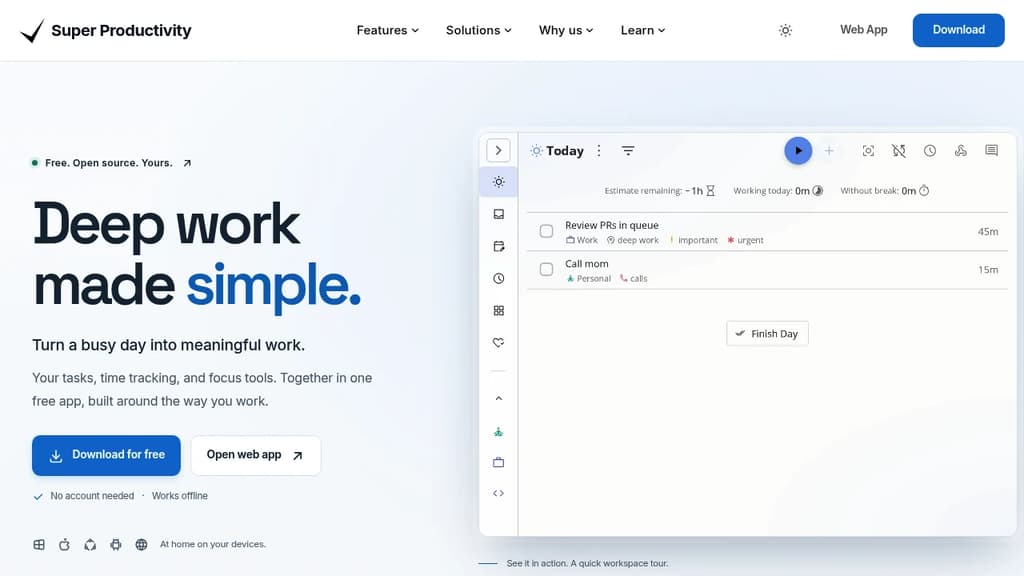
Privacy-first task manager combining task lists, Kanban, Pomodoro timers, time tracking, and integrations with GitHub, GitLab, and Jira. No account required, works offline.




Last 30 days
Last commit
3 hours agoRepository age
10 yearsVersion
v19.2.0License
MITRepository
super-productivity
Super Productivity is a time and task management app built for people who want to do focused, meaningful work without the overhead of accounts, subscriptions, or cloud lock-in. It runs on Windows, macOS, Linux, Android, iOS, and the web. Your data stays on your device by default.
It goes well beyond a simple to-do list. You can organize work as a flat list, a Kanban board, or an Eisenhower Matrix, then drop into a distraction-free focus mode with a built-in Pomodoro timer and customizable breaks. Time tracking is built in, not bolted on, so you can see where your day actually went without switching to a separate tool like ActivityWatch or SolidTime.
Key capabilities include:
- GitHub, GitLab, and Jira integration pulls issues directly into your task list, keeping context close without constant tab switching
- Two-way Trello sync lets you work in Super Productivity while keeping a shared Trello board up to date
- Multiple Google Calendar accounts can be connected at once, so personal and work schedules appear in one view
- Live Markdown notes attach rich, editable notes to tasks as you work
- Multi-select task actions let you move, reschedule, or complete a batch of tasks in one go
- Timeboxing helps you assign time budgets to tasks before the day starts
- Full data export means you're never locked in
It's a practical fit for developers, freelancers, students, and anyone running a GTD-style system. Compared to tools like Todoist, it requires no account and no paid tier to access core features. Everything works offline. The open-source codebase is actively maintained, with a community that ships meaningful updates regularly.
Tags:










Last 30 days
Last commit
3 hours agoRepository age
10 yearsVersion
v19.2.0License
MITRepository
super-productivity
Every Sunday we deconstruct one proprietary app and pick the best open source alternatives worth switching to.
Similar open source projects

Stars
Last commit
License
Stars
Last commit
License
Stars
Last commit
License
 Sent – A unified API for sending messages across SMS, RCS, and apps like WhatsApp.
 Sent
Sent Stellar Hosted