Open Source AI Agents: 8 You Can Run Yourself (2026)
Compare the 8 best open source AI agents you can run yourself in 2026, from Goose and Hermes Agent to Agent Zero and OpenHands, with licenses and pricing.

Written by Piotr Kulpinski

A chatbot answers questions. An agent does the work: it plans the steps, opens a browser, runs code, edits files, and keeps going until the task is done or it needs your input. For most of 2025 the best agents were closed products like Manus and ChatGPT's agent mode. In 2026 the open-source side caught up, and several open source AI agents now run on your own laptop or server with the model of your choice.
Interest has followed. US searches for "open source AI agents" grew more than twentyfold between April and August 2026. The problem is that the term covers very different things: a desktop app that tidies your files, a server that lives in your Telegram, a library that drives a browser, and a platform for building agent workflows. Licensing varies just as much, and two of the best-known "open source" agents now use source-available licenses.
This guide compares the 8 best open-source AI agents you can run yourself in 2026, what each one is good at, and where the catch is.
TL;DR: Goose is the best general-purpose open-source agent for most people: Apache-2.0, a desktop app and CLI, and support for local models. Hermes Agent is the pick for an always-on agent that learns your workflows, and Agent Zero gives an agent its own Linux computer to work on. For coding, OpenHands leads. The full comparison table is further down.
AI Agents vs Frameworks vs Chatbots
The word "agent" gets attached to almost everything now, so it helps to separate three kinds of software:
- Chatbots answer in a conversation. Open WebUI or Jan with a local model is a chatbot, even if it can call a tool or two.
- AI agents are finished applications that take a goal and carry it out on their own: planning, using tools, checking results, and asking you when they get stuck. You install them and give them tasks. This article is about these.
- Agent frameworks are libraries developers use to build their own agents, such as LangGraph, CrewAI, or Google's ADK. They need code before they do anything, so we cover them only briefly below.
A useful test: if you can install it and ask it to "research these five competitors and put the findings in a spreadsheet" without writing code, it is an agent.
How We Picked
Every agent below is ready to run without writing code, can work with more than one model provider, and was actively maintained as of September 2026. We compared how you run each one, whether it works with local models, how it isolates what the agent does, what it costs, and whether the license is really open source. Two entries use source-available licenses, and we say so in each case. We track the whole category in AI Agent Platforms.
The 8 Best Open Source AI Agents
1. Goose
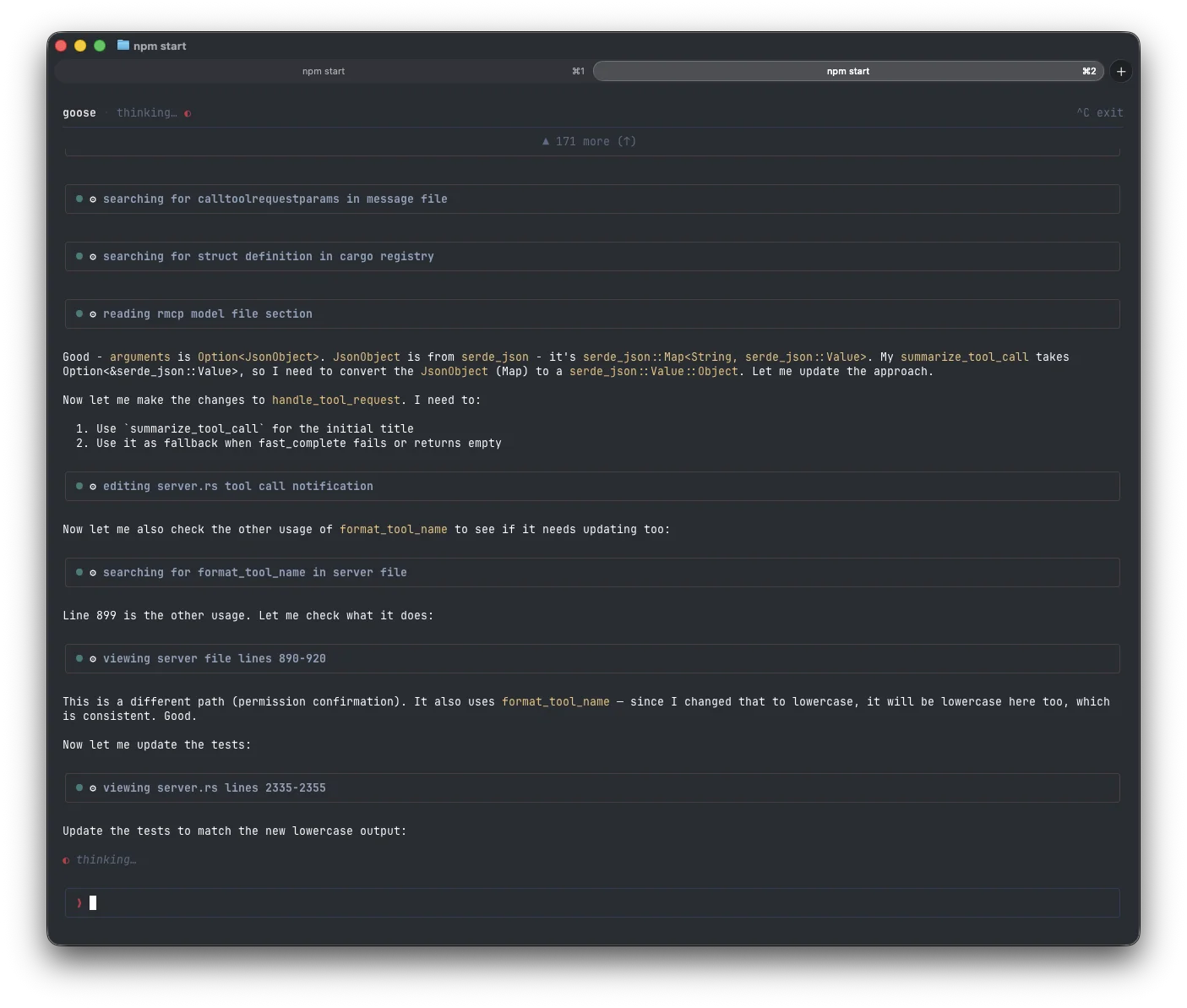
Goose is a general-purpose agent that runs on your own machine, with a native desktop app for macOS, Linux, and Windows plus a full command-line interface. Block built it and open-sourced it in January 2025, then donated it to the Linux Foundation's new Agentic AI Foundation in December 2025, alongside Anthropic's MCP and OpenAI's AGENTS.md. In April 2026 the project moved to its own GitHub organization under neutral, community governance.
Goose is built around MCP (Model Context Protocol), the standard way to plug tools into an agent, and ships with more than 70 extensions. It works with over 15 model providers, can reuse a Claude or ChatGPT subscription, and runs local models through Ollama, LM Studio, RamaLama, or any OpenAI-compatible server. Since April 2026 it can also download a model and run it fully offline with built-in llama.cpp inference. Recipes turn a successful session into a reusable workflow, and a scheduler can run recipes on their own.
Key Features and Considerations
Goose runs in autonomous mode by default, with your own user permissions and no container between it and your files. Manual and "Smart Approve" modes exist, and an optional adversary mode adds a hidden reviewer agent that blocks risky tool calls, but you have to turn them on. The built-in offline models also have small context windows (4K to 8K tokens), so serious work still needs Ollama or a hosted model.
- Pros:
- Apache-2.0 under Linux Foundation governance, with no paid tier.
- Desktop app, CLI, and API, on all three desktop platforms.
- 70+ MCP extensions, recipes, a scheduler, and parallel subagents.
- Cons:
- Full access to your machine by default; switch on approvals for sensitive work.
- Weekly releases mean frequent changes.
Website: https://goose-docs.ai
2. Hermes Agent
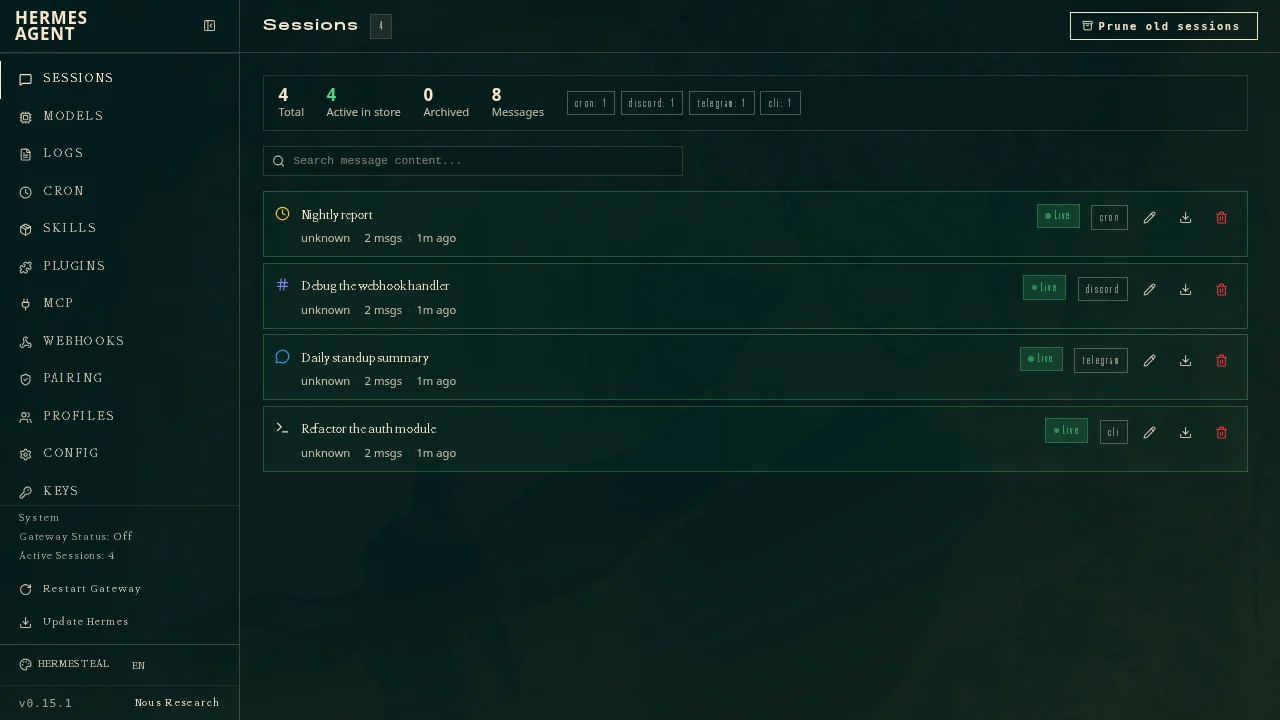
Hermes Agent from Nous Research is one of the fastest-growing projects on GitHub, past 248,000 stars about 14 months after launch. Its central idea is self-improvement: when it finishes a task, it saves the steps as a reusable skill and refines that skill the next time, while keeping memory across sessions. The more often you give it a kind of task, the better it should get at it.
Hermes is built to stay running. You install it on a server or VPS, or on serverless backends like Modal and Daytona, and talk to it from the terminal, Telegram, Discord, Slack, WhatsApp, or Signal. A cron scheduler runs recurring jobs, and a web dashboard shows every session, model, skill, and MCP server. It is MIT-licensed and works with any provider, including your own OpenAI-compatible endpoint. For more always-on assistants you can reach from chat apps, see our OpenClaw alternatives.
Key Features and Considerations
An agent that rewrites its own skills is also harder to predict. Review the skills it creates, give it scoped credentials rather than your main accounts, and pick a backend with isolation for anything that runs code. Nous Research sells an optional Nous Portal subscription that bundles models, web search, and other tools under one key; you can ignore it and bring your own keys.
- Pros:
- Learns reusable skills and keeps long-term memory.
- Reachable from five chat platforms plus the terminal.
- MIT license and free choice of model provider.
- Cons:
- Needs a server or cloud backend to be useful.
- Self-written skills need human review.
Website: https://hermes-agent.nousresearch.com
3. Agent Zero
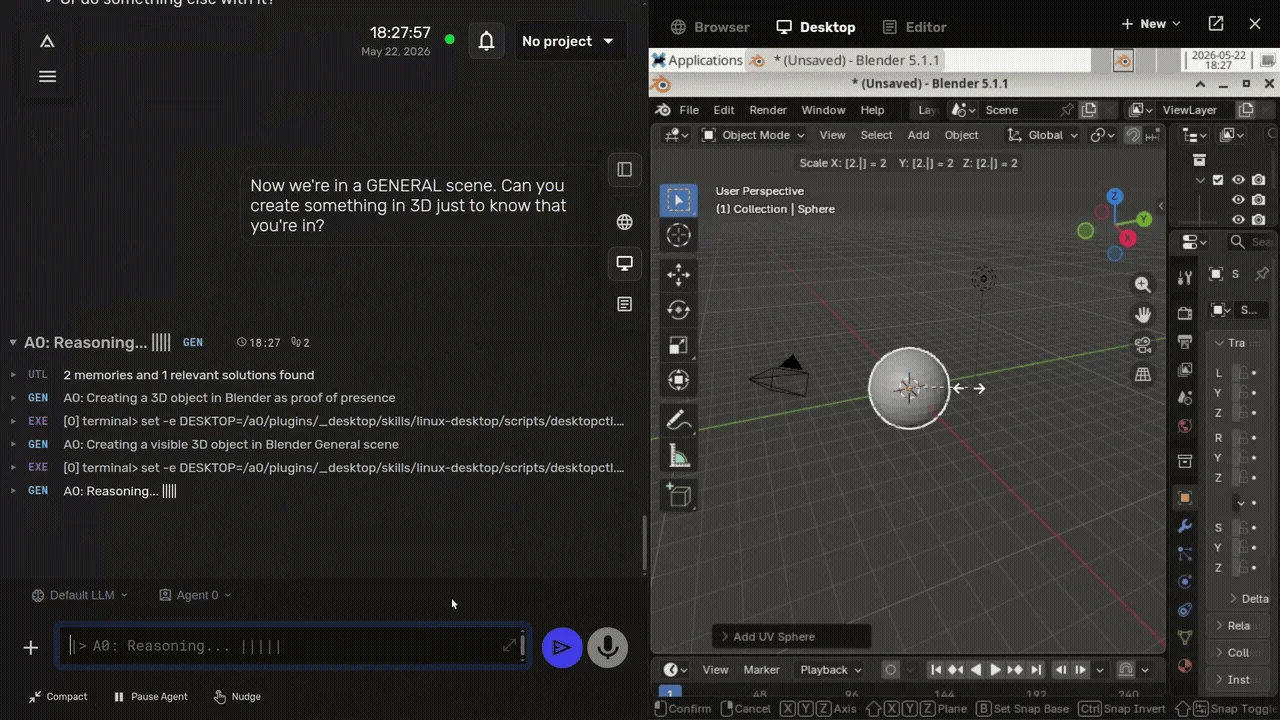
Agent Zero gives the agent its own computer. Everything runs inside a Docker container with a full Linux desktop, a browser, a terminal, and LibreOffice, and you watch and steer it from a web UI. Ask for a 3D model and it opens Blender; ask for a document and it can write one in LibreOffice. It is MIT-licensed, runs on anything from a $6 VPS or Raspberry Pi to a GPU server, and a desktop launcher handles setup on macOS, Linux, and Windows.
The feature list is long: per-project memory and secrets, subordinate agents, MCP and A2A support, scheduled tasks, Telegram, WhatsApp, and email integrations, a plugin hub with more than 100 community plugins, and "time travel" snapshots that let you roll back what the agent did. It supports local models through Ollama, LM Studio, llama.cpp, and vLLM, and bundles its own search engine, so a fully offline setup works.
Key Features and Considerations
The container is the safety boundary, and today the agent, its tools, and the framework itself all share it. Version 3, previewed in August 2026, moves agent code into separate sandboxes. Don't mount your home folder into it. Releases arrive every week or two, and security fixes (including a CVE patched in v2.9) come with them, so keep it updated. There is no paid tier; the project is funded by GitHub Sponsors and its own A0T crypto token.
- Pros:
- A real desktop environment the agent can operate, visible in the browser.
- Fully local operation with bundled search.
- MIT license and a large plugin ecosystem.
- Cons:
- Heavy Docker image; needs Docker even for a quick test.
- Current isolation is one shared container.
Website: https://www.agent-zero.ai
4. OpenHands
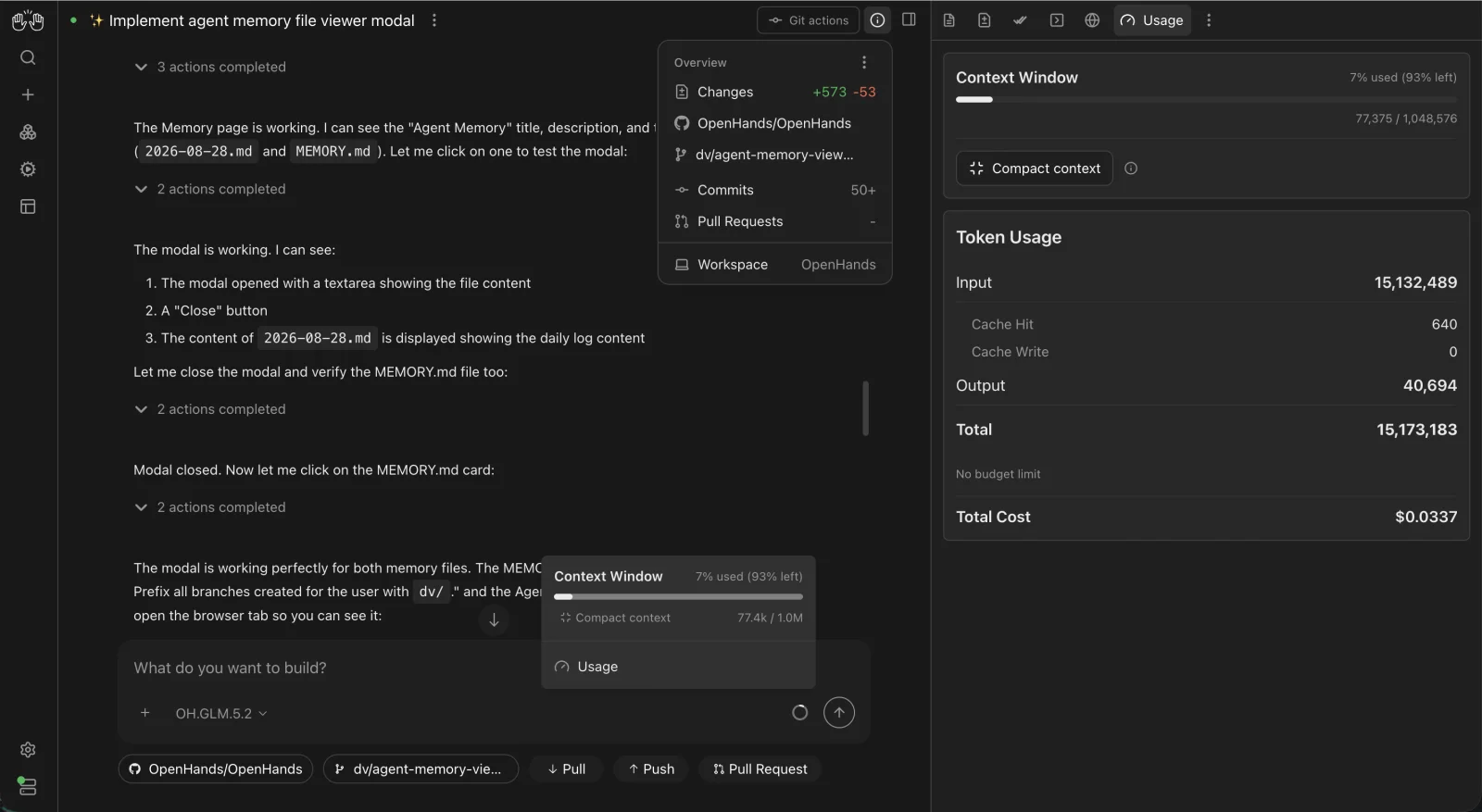
OpenHands is the leading open-source agent for software work, with 89,000 GitHub stars. Its current flagship is Agent Canvas, a self-hosted "control center" for coding agents and automations that launched in beta in June 2026. You run it through npm, Docker, or desktop apps, and one interface can drive the OpenHands agent as well as Claude Code, Codex, or Gemini on local machines, Docker containers, or VMs.
Beyond interactive coding sessions, Canvas runs automations on a schedule or in response to GitHub and webhook events, with Slack, Linear, and Notion integrations. It works with any model through LiteLLM, and the docs cover local models through Ollama, LM Studio, vLLM, and SGLang, recommending a model that fits in 24 GB of VRAM or 64 GB of unified memory.
Key Features and Considerations
OpenHands is focused on code rather than general tasks. Canvas is still labeled beta, and the architecture changed in mid-2026, so older tutorials no longer match. The quick npm install runs the agent directly on your machine; use the Docker setup when you want a sandbox. A free cloud tier allows 10 conversations a day, and enterprise plans are custom-priced.
- Pros:
- The strongest open-source option for coding tasks and repo automation.
- Drives other coding agents from the same interface.
- MIT license with desktop, Docker, and cloud options.
- Cons:
- Coding-centric, not a general assistant.
- Canvas is beta and the docs are catching up.
Website: https://openhands.dev
5. Eigent
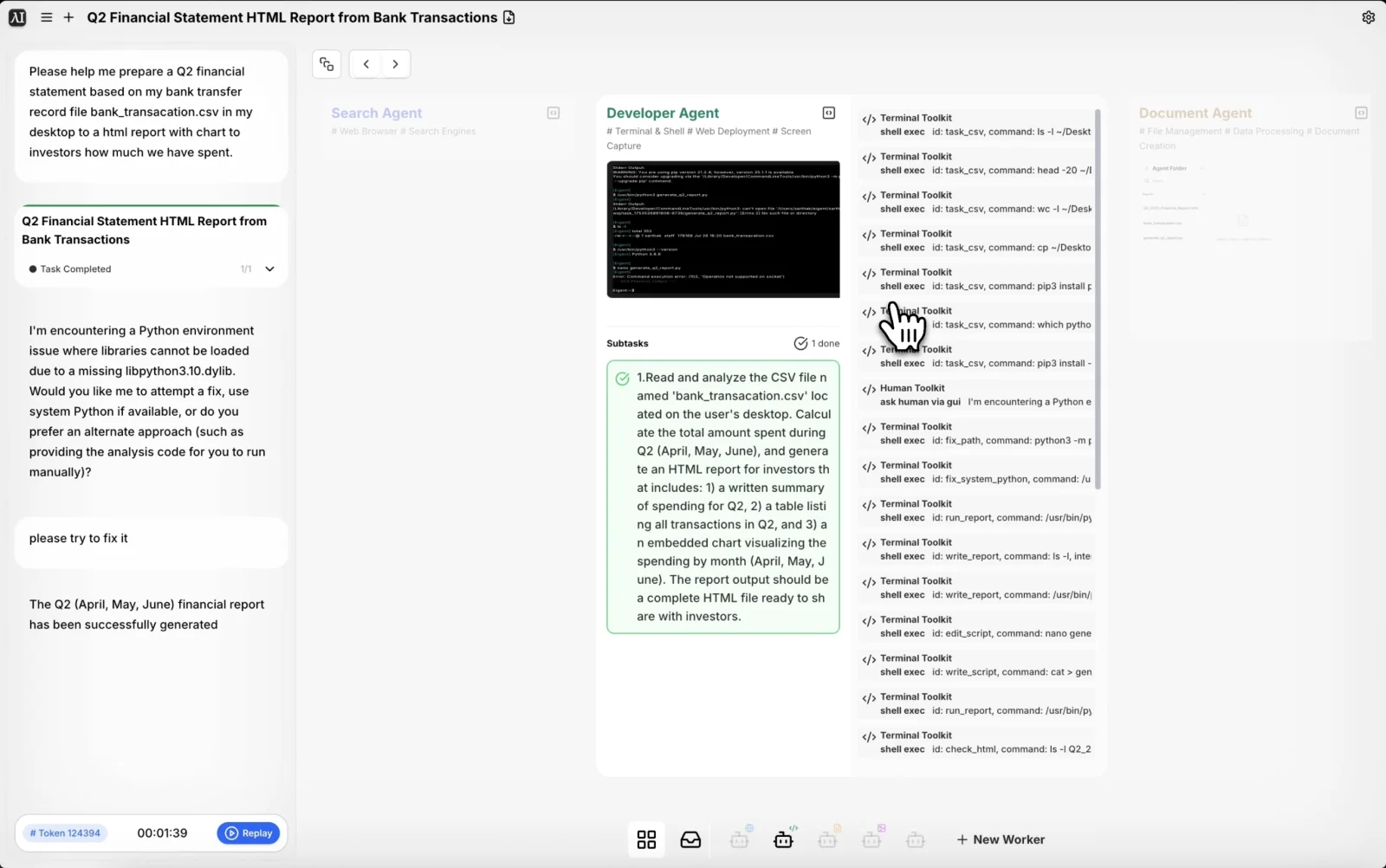
Eigent calls itself "the open source Cowork desktop", and it is the closest open-source match for Claude Cowork. Built by the CAMEL-AI team on their multi-agent framework, it splits a task across a small workforce: a coordinator and a planner hand subtasks to Developer, Browser, Document, and Multi-modal agents that work in parallel on your local files, browser, and terminal. When something fails, it retries or re-plans, and it asks you in the app when it needs a decision.
Version 1.0 in June 2026 added a single-agent mode, Git-backed workspaces with per-task diffs, remote control, and built-in MCP connectors; later releases added durable tasks that survive a crash. It runs on macOS, Windows, and Linux, works with a long list of providers, and supports local models through Ollama, vLLM, SGLang, LM Studio, and llama.cpp.
Key Features and Considerations
The downloadable app asks you to log in, and a fully local setup means running it from source with a Docker backend. Multi-agent runs also use a lot of tokens: the task in the screenshot above consumed about 124,000. Your own API keys and local models are free; hosted credits start at $19.99 a month.
- Pros:
- Multi-agent workforce with parallel specialist agents.
- Desktop app on all three platforms, Apache-2.0 licensed.
- Local model support across five runtimes.
- Cons:
- Login required unless you run from source.
- Token-hungry, and Linux builds still have rough edges.
Website: https://www.eigent.ai
6. Browser Use
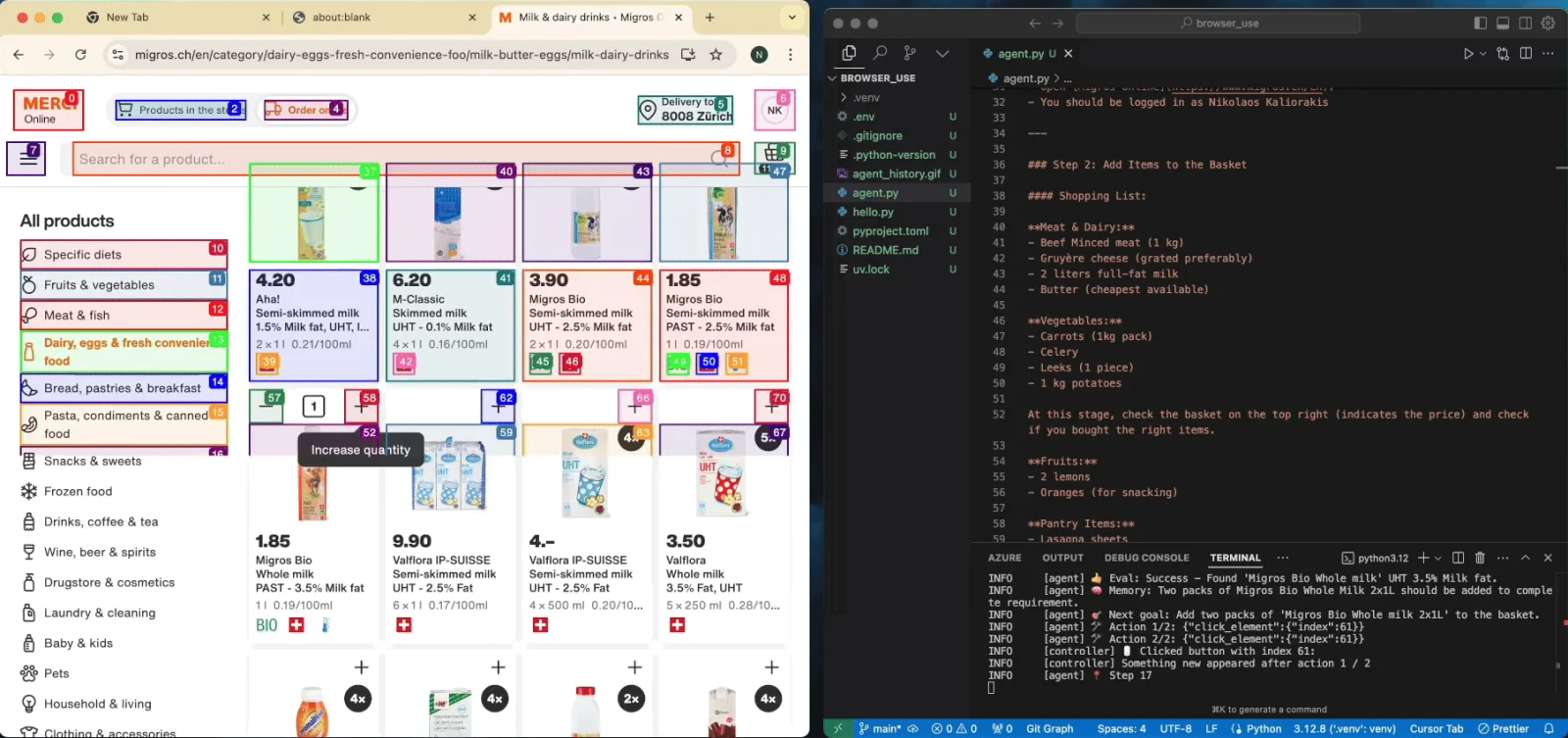
Browser Use is the most popular open-source agent for the web, with 116,000 GitHub stars. Give it a task in plain language and it drives a real Chromium browser to do it: searching, clicking, filling forms, and extracting data. It can reuse your Chrome profile so logged-in sites work, keeps passwords out of the prompt with placeholders, and returns structured output you define. It also ships an MCP server and a CLI that give coding agents like Claude Code a browser.
It is MIT-licensed and works with OpenAI, Anthropic, Google, and local models through Ollama, so a fully local setup is possible, hardware permitting.
Key Features and Considerations
Browser Use is a Python (and TypeScript) library, not an app, so it suits developers. Non-developers will end up on the paid cloud, which bills per browser-hour ($0.02) plus model usage and adds stealth browsing, CAPTCHA solving, and proxies. Two more caveats: the API changes often between versions, and an agent in a logged-in browser is exposed to prompt injection from any page it reads, so check important actions yourself.
- Pros:
- The best open-source option for web tasks and scraping.
- MIT license, local model support, and an MCP server.
- Cons:
- A developer library; the easy path is the paid cloud.
- Frequent breaking changes between versions.
Website: https://browser-use.com
7. AutoGPT
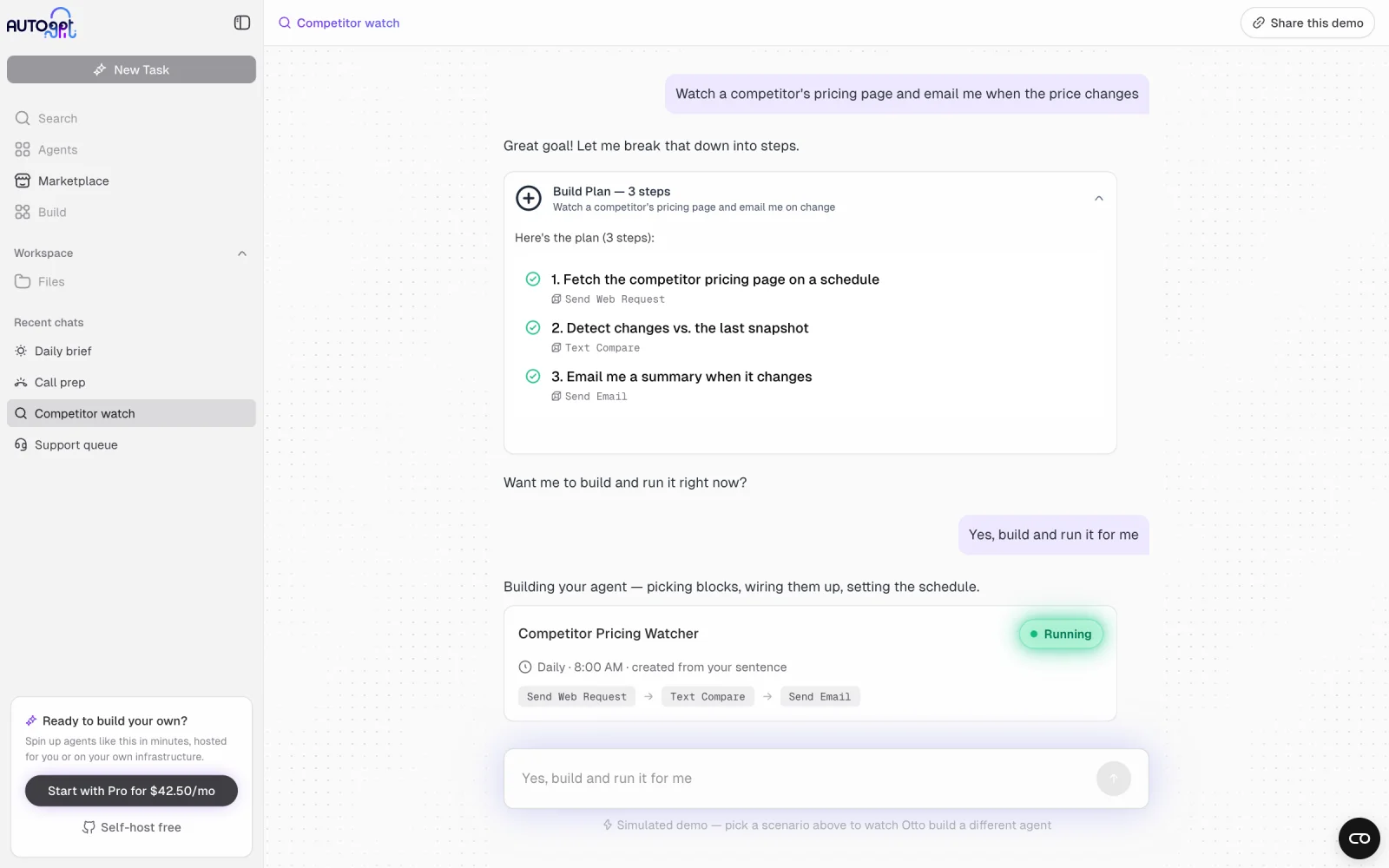
AutoGPT started the autonomous-agent craze in 2023 and, at 187,000 stars, is still one of the most-starred projects on GitHub. Today it is a platform for agents that handle recurring work. You describe the job in a chat called AutoPilot, it builds the agent from blocks, and the agent runs on a schedule or a trigger: daily briefings, prospect research, competitor monitoring. A visual builder, a marketplace of community agents, and 45 or more integrations (Gmail, Slack, Notion, HubSpot) round it out. Since June 2026, AutoPilot can run on a local model through any OpenAI-compatible endpoint.
Key Features and Considerations
Check the license before you build on it. The original AutoGPT agent is MIT, but the platform people actually run is under the PolyForm Shield license: free to use and modify, including inside a business, but you can't offer it as a product that competes with AutoGPT. That makes it source-available rather than open source. Self-hosting is also heavy: Postgres, three Redis instances, RabbitMQ, a graph database, and about eight services, plus an external E2B account for the code sandbox. The hosted version starts at $50 a month.
- Pros:
- The easiest way to build scheduled, no-code agent workflows.
- Large marketplace and integration catalog.
- Cons:
- Platform code is source-available (PolyForm Shield), not open source.
- Heavy self-hosted stack, still labeled beta.
Website: https://agpt.co
8. Kortix (formerly Suna)
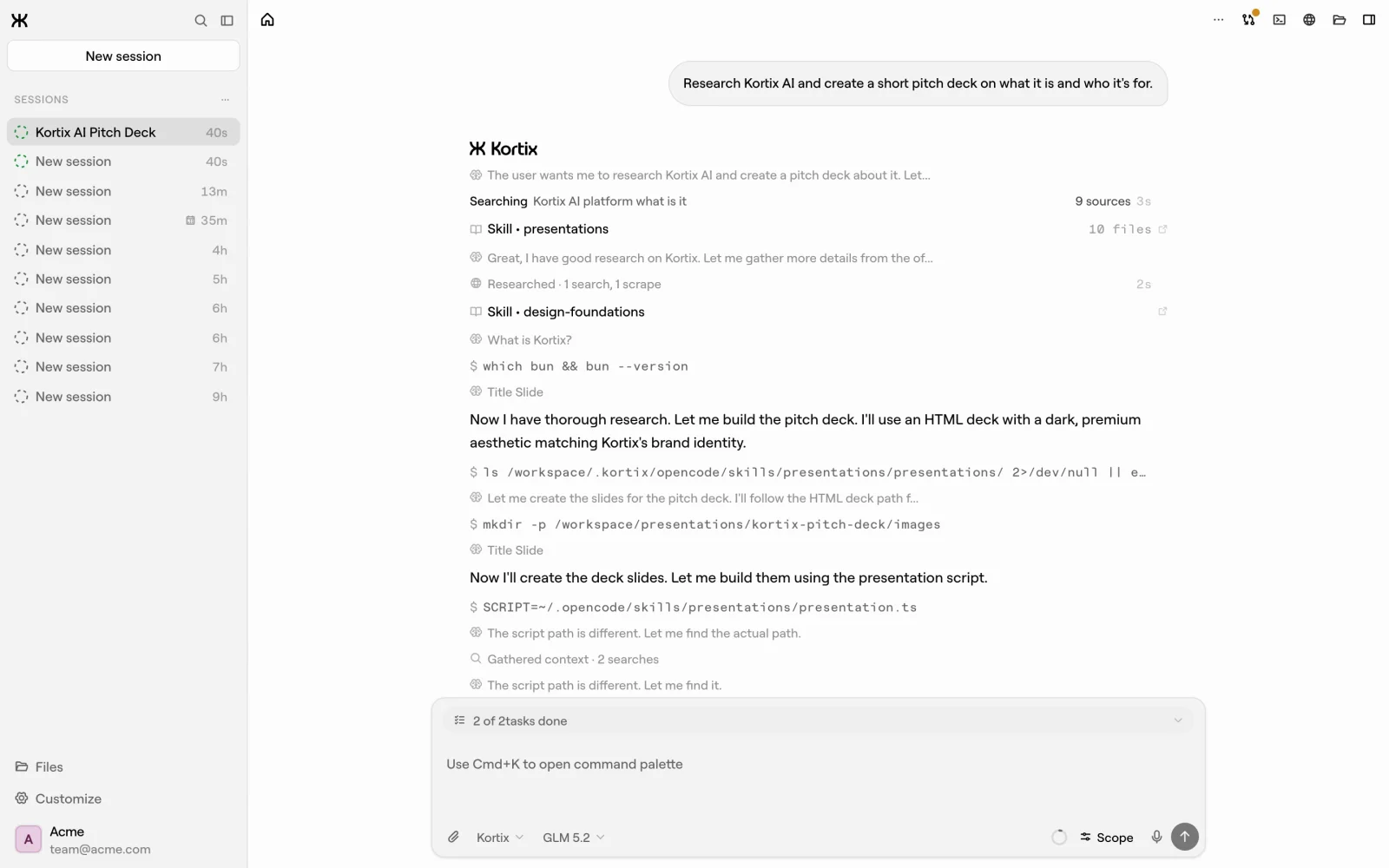
Kortix, formerly Suna, launched in 2025 as an open-source Manus alternative and has since become an "AI management system" for teams. A company's agents, skills, memory, and connectors live in one Git repository. Every agent session runs in its own cloud sandbox on a separate branch, and results reach the main branch only after a human approves the change, like a pull request. It connects to more than 3,000 apps, runs on cron and webhook triggers, and works in Slack and Microsoft Teams, with role-based access control and an audit trail.
Key Features and Considerations
Two changes matter here. The license moved from Apache-2.0 to the Elastic License 2.0 in February 2026, which bans offering it as a hosted service and makes it source-available. And while kortix self-host start still runs the platform on your own server, agent sandboxes always run on an outside provider such as Daytona or E2B, so it cannot run fully local. The free cloud plan includes 200 credits a month; Team is $40 per seat.
- Pros:
- Built for teams, with human approval, permissions, and audit trails.
- Huge connector catalog and chat-app channels.
- Cons:
- Elastic License 2.0, not open source.
- Sandboxes need an external provider; no fully local mode.
Website: https://kortix.com
Personal Assistant Agents: OpenClaw and Friends
A related category deserves its own mention: always-on personal assistants you message like a friend. OpenClaw is the biggest open-source project in this space, with more than 390,000 stars. It is MIT-licensed, run by a non-profit foundation with no paid tier, and reachable through more than 20 chat apps plus native apps on every platform. Where Hermes Agent focuses on learning your workflows, OpenClaw focuses on being available everywhere. Our Hermes Agent vs OpenClaw comparison covers the differences, and NanoClaw is a lighter alternative to both.
What About Coding Agents and Frameworks?
If your agent work is mostly code, look at dedicated coding agents: OpenCode, Cline, and Open Interpreter, which in 2026 rebuilt itself as a terminal coding agent tuned for open-weight models. We keep all of them in AI Coding Agents.
If you want to build your own agent, you need a framework rather than any tool above. The most popular are LangGraph and CrewAI (both MIT), Hugging Face's smolagents, Pydantic AI, the OpenAI Agents SDK, and Google's ADK. Microsoft's AutoGen is now in maintenance mode, with new users pointed to the Microsoft Agent Framework. Agno is a fast Python option, and visual builders like Dify and Langflow sit in between, letting you assemble agents without much code.
Running AI Agents Safely
An agent is only as safe as what it can reach. Giving one your browser session, your terminal, and your email is useful and risky, and the risks are now well documented. The OWASP Top 10 for Agentic Applications lists goal hijacking through prompt injection (a web page or email telling the agent to do something else), tool misuse, unexpected code execution, abuse of the credentials the agent can access, and memory poisoning.
In practice, four habits cover most of it:
- Isolate execution. Prefer agents that work in a container or sandbox (Agent Zero, OpenHands in Docker, Kortix's sandboxes) over ones with full access to your machine.
- Scope credentials. Give the agent its own accounts and narrow API tokens, never your main login.
- Keep approvals on for anything that sends, deletes, buys, or deploys. Goose's approval modes and Kortix's change requests are good examples.
- Review what it learns. Skills and memories that an agent writes for itself should get the same review as code a colleague wrote.
Comparison Table
| Agent | License | Stars | Best For | Interface | Local Models | Paid Cloud |
|---|---|---|---|---|---|---|
| Goose | ✅ Apache-2.0 | 55k | General tasks on your machine | Desktop, CLI | ✅ | ❌ None |
| Hermes Agent | ✅ MIT | 249k | Always-on agent that learns | Server, chat apps | ✅ | 🟧 Optional |
| Agent Zero | ✅ MIT | 19k | Agent with its own computer | Web UI, desktop launcher | ✅ | ❌ None |
| OpenHands | ✅ MIT | 89k | Coding and repo automation | Web UI, desktop | ✅ | ✅ Free tier + enterprise |
| Eigent | ✅ Apache-2.0 | 15k | Multi-agent desktop work | Desktop | ✅ | ✅ From $19.99/mo |
| Browser Use | ✅ MIT | 116k | Web tasks and scraping | Python library | ✅ | ✅ Pay as you go |
| AutoGPT | 🟧 PolyForm Shield + MIT | 188k | Scheduled no-code workflows | Web UI | ✅ | ✅ From $50/mo |
| Kortix | 🟧 Elastic-2.0 | 20k | Team agents with approvals | Web, desktop, CLI | 🟧 Sandboxes stay in the cloud | ✅ From $40/seat |
Legend: ✅ yes · 🟧 partial or with caveats · ❌ no · "Local Models" means the agent can run on a model served from your own hardware. Stars are GitHub stars as of September 2026, when all licensing, pricing, and feature details in this article were last verified.
Which Open Source AI Agent Should You Choose?
- You want one capable agent on your own computer: Goose. Desktop app, CLI, local models, and no paid tier.
- You want an agent that lives in your chat apps and improves over time: Hermes Agent, or OpenClaw if availability matters more than learning.
- You want the agent contained in its own environment: Agent Zero, which gives it a full Linux desktop inside Docker.
- You mostly want code written and repos maintained: OpenHands. To run several coding agents side by side, see our AI coding agent orchestrators guide.
- You want an open alternative to Claude Cowork: Eigent.
- You need an agent that works in websites for you: Browser Use.
- You want recurring no-code workflows and accept a source-available license: AutoGPT.
- You are rolling out agents to a team with approvals and audit logs: Kortix, eyes open about the license.
If you are here because of a closed tool, we also keep lists of open-source Manus alternatives and Claude Cowork alternatives.
Frequently Asked Questions
What is the best open source AI agent?
For most people, Goose is the best starting point: it is Apache-2.0 licensed, governed by the Linux Foundation, runs as a desktop app or CLI on all major platforms, and works with local models. Hermes Agent is the stronger choice for an always-on agent that learns your routines from chat apps.
Can I run an AI agent completely locally?
Yes. Goose, Agent Zero, Hermes Agent, OpenHands, Eigent, and Browser Use can all run on a model served from your own hardware through Ollama, llama.cpp, LM Studio, or vLLM. Agent tasks need strong models and long context, so expect a capable GPU or a Mac with plenty of unified memory for good results.
Is AutoGPT still open source?
Partly. The original AutoGPT agent remains MIT-licensed, but the AutoGPT Platform, which is what the project now ships and hosts, uses the PolyForm Shield license. You can use and modify it for free, including at work, but you cannot offer it as a competing product, so it is source-available rather than open source.
What happened to Suna?
Suna, the open-source Manus alternative from 2025, was renamed Kortix in August 2025 and rebuilt as a team platform for managing agents. Its license changed from Apache-2.0 to the Elastic License 2.0 in February 2026. You can still self-host it, but agent sandboxes run on an external provider such as Daytona or E2B.
What is the difference between an AI agent and an agent framework?
An AI agent is a finished application: you install it, give it a goal, and it plans and carries out the work. An agent framework, such as LangGraph or CrewAI, is a library developers use to build their own agents in code. Frameworks are more flexible, but nothing happens until you write the agent yourself.
Are open source AI agents safe to use?
They can be, if you limit what they can reach. Run agents in a container or sandbox where possible, give them their own accounts and narrow API tokens, and keep approvals on for actions that send, delete, buy, or deploy. The main risk is prompt injection, where content the agent reads tells it to do something you didn't ask.
Final Thoughts
Open-source agents went from demos to everyday tools in about a year. The strongest projects now come from foundations and research labs (Goose at the Linux Foundation, Hermes Agent from Nous Research, OpenClaw's non-profit) rather than startups racing to a paid tier, and that is a good sign for anyone who wants their agent to stay theirs.
The other trend runs the opposite way: AutoGPT and Kortix, two of the best-known names, both moved to source-available licenses as they built businesses. Before you hand an agent your files and accounts, check the license, check where its code actually runs, and keep approvals on until you trust it.
We'll keep the AI Agent Platforms category updated as new agents launch. If you build or use an open-source agent we should know about, submit it to OpenAlternative.

 Openlane – Open-source, developer-first platform for automated compliance, risk management, and built-in Trust Center.
 Sent
Sent