
Macro Docs
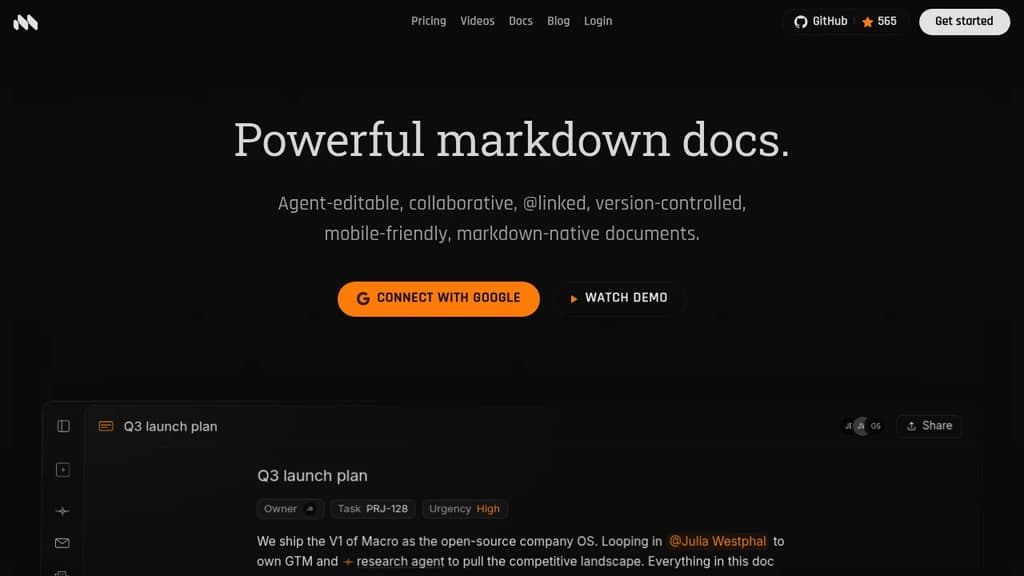
Collaborative markdown documents with real-time CRDT editing, AI agent cursors, mention linking, and built-in properties tied to your tasks, channels, and email.
Open Source Alternative to:




Last 30 days
Last commit
8 hours agoRepository age
1 yearVersion
v2026.11.2.0License
AGPL-3.0Repository
macro-inc/macro
Macro is a markdown-native document editor built to live inside a broader workspace, not alongside one. Every doc connects directly to tasks, email, channels, and AI agents through @mentions that render as live inline pills. What sets Macro apart from tools like Notion or Google Docs is the agent layer. AI agents can edit documents alongside you with a live cursor, not just suggest a diff.
Key capabilities include:
- @mention anything: people, docs, tasks, channels, and calls all render as live inline pills inside any page.
- Markdown-native: type standard markdown and it formats in real time; export back to clean plain markdown anytime.
- Document properties: attach status, assignee, tags, dates, and custom fields directly to a doc without leaving the editor.
- Slash commands: insert headings, tables, code blocks, math equations, and task items with a single keystroke.
- Inline comments and version history: comment on any selection, resolve threads, and restore or fork any past version.
- Unified search: one search index across docs, tasks, email, and channels.
The editing foundation is built on CRDTs (Conflict-free Replicated Data Types), which means multiple people can type on the same line simultaneously without conflicts. Edits apply locally first and reconcile in the background, so the experience stays fast even offline. The backend is written in Rust with a SolidJS frontend, and each document runs as its own Durable Object in the cloud, keeping latency low. Macro is licensed under AGPLv3.
Macro is aimed at teams who want the writing experience of something like Outline or Logseq but need their docs to stay in sync with everything else happening at work. Things can be @mentioned directly in a doc and given context from tasks, channels, or email threads in the same workspace.
Tags:











Last 30 days
Last commit
8 hours agoRepository age
1 yearVersion
v2026.11.2.0License
AGPL-3.0Repository
macro-inc/macro
Every Sunday we deconstruct one proprietary app and pick the best open source alternatives worth switching to.
Similar open source projects

Stars
Last commit
License
Stars
Last commit
License
Stars
Last commit
License
 Stellar Hosted – Managed Open Source software hosting in the EU: secure, compliant, fast.
 Docmost
 CodeRabbit