Open Source Text Blaze Alternatives
A curated collection of the 2 best open source alternatives to Text Blaze.
The best open source alternative to Text Blaze is Espanso. If that doesn't suit you, we've compiled a ranked list of other open source Text Blaze alternatives to help you find a suitable replacement. Other interesting open source alternative to Text Blaze is Typerelay.
Text Blaze alternatives are mainly Text Expander Tools. Browse these if you want a narrower list of alternatives or looking for a specific functionality of Text Blaze.

Written by Piotr Kulpinski


Cross-platform text expander that replaces typed keywords with full snippets, templates, dates, emojis, or script output across any app.

Espanso is a text expander that watches what you type and replaces short keywords with longer content the moment you trigger them. Type :email and get a full email template. Type :date and get today's date. It works system-wide across virtually any application, so you're not limited to a single browser or editor.
It's built for anyone who types the same things repeatedly: customer support agents, developers inserting code snippets, medical professionals writing reports, or security researchers pasting payloads. If you've used TextExpander or PhraseExpress before, Espanso covers most of the same ground without a subscription.
Key capabilities include:
- Keyword triggers that expand to text, emojis, dates, or dynamic content as you type
- Forms support for complex templates where you fill in fields before the snippet is inserted
- Shell and script integration so snippets can run a command and inject its output directly into any app
- Package ecosystem for extending functionality, with community packages for things like mathematical notation, accented characters, and emoji shortcuts
- ALT+Space search bar to find any snippet when you don't remember its trigger
- File-based configuration following a Unix-like philosophy, making it easy to version-control your snippets
- Cross-platform support across Windows, macOS, and Linux
The shell integration is where Espanso pulls ahead of simpler alternatives. You can pipe in your current IP address, generate a timestamp from a script, or forward form values into custom code. That makes it genuinely useful for technical workflows, not just boilerplate text.
Configuration lives in plain files, which means your snippets are portable and easy to back up or sync. A GUI is planned but not yet available, so comfort with text files helps. It's licensed under GPL-3.

Text expander that replaces typed abbreviations with saved replies, signatures, and snippets across macOS, Windows, and Linux.
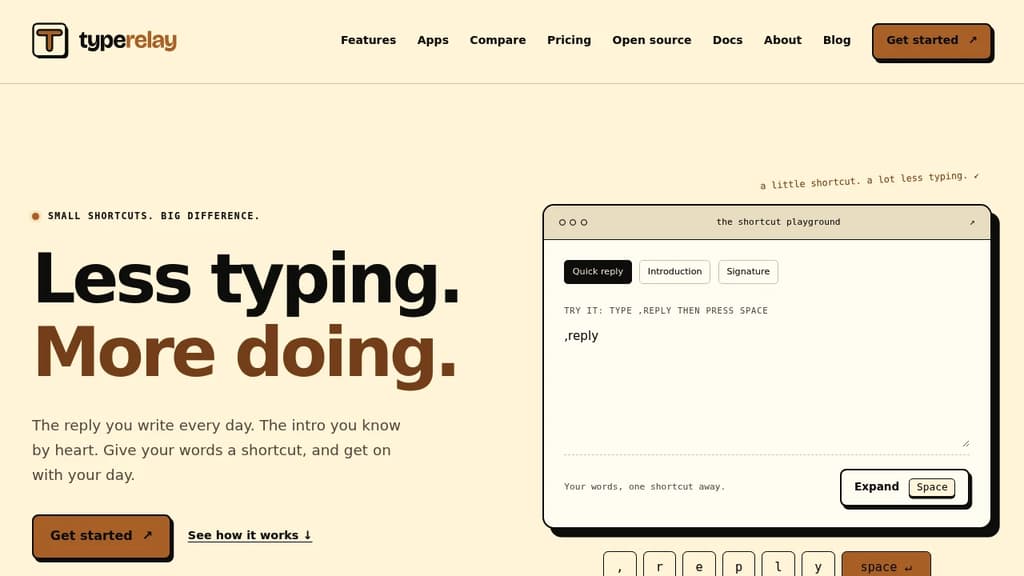
Typerelay is a text expander for anyone who types the same things over and over. You save a phrase, paragraph, or signature once, assign it a short abbreviation, and from then on typing that abbreviation followed by Space pastes your full text wherever you're working. No more hunting through old emails or copying from notes.
It's built around three core ideas:
- Save your words, store any sentence, paragraph, or signature you reach for regularly, from customer replies to meeting links to sign-offs
- Pick a shortcut, assign a short, memorable trigger like
,replyor,signthat won't fire by accident - Tap Space, done, Typerelay replaces the trigger with your saved text, ready to edit or send as-is
The tool runs natively on macOS, Windows, and Linux. A free plan covers personal use on one machine. Upgrading to Pro adds web sync so your shortcuts follow you across computers. The Team plan layers in shared snippet libraries and team management, useful when a whole support team or department needs consistent wording.
Private and shared snippets sit side by side. Your personal library stays yours; shared snippets go out to whoever you add to your team. That split matters when you want standard replies for a team but personal shortcuts for your own workflow.
Dynamic extensions let snippets go beyond fixed text, so you can add variable or conditional behavior when a static phrase isn't quite enough.
Typerelay is a focused tool. It doesn't try to be a full note-taking app or a broader personal information manager. It does one thing: get your most-used words out of your head and into a shortcut. The trigger-then-Space interaction is intentionally simple, which keeps it out of the way until you need it.

People are looking for alternatives to...
View all alternatives
Spotify

Claude Code

Claude

CapCut

Notion

Lovable
 Sent – Messaging Infrastructure for Developers. One API for SMS, WhatsApp, and RCS across 190+ countries.
 Sent
Sent